Claude in Chrome site categories
A community registry of which sites Claude in Chrome treats as "prompt on every action", "blocked" or "normal". Anthropic keeps this list private. Here it is collected by users, one observation at a time, with a date and a method.
What is this about
Before Claude in Chrome acts on a page, the extension sends the page address to an Anthropic server and gets back a category for the domain. The category decides what you see:
- category0 normal site: "Always allow" works.
- category3 Claude asks on every action; "Always allow" is disabled; side panel modes ("Automatically approve", "Skip all approvals") do not change it.
- category4 one-time copyright confirmation per domain, then normal.
- category1 blocked: the tab goes to a blocked page.
- category2 blocked without a page (purpose not described in the extension code).
Source: the extension code (version 1.0.102) and server responses seen in DevTools. Details, request and response format are in the README.
Check your site in 1 minute (no DevTools)
You need Chrome with the Claude extension. Open the site, then tell Claude in the side panel: "Open this page and click any safe link in the menu. Do not type or submit anything." Look at the first dialog Claude shows and match it below.
 category0
A permission dialog with an "Always allow" button. Normal site. Once allowed, Claude stops asking on this domain.
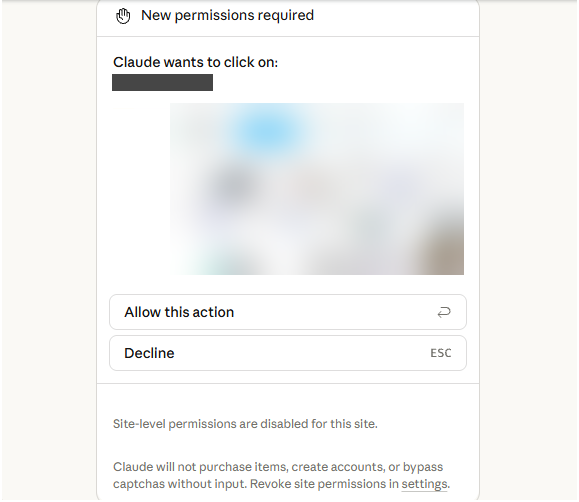 category3
Only a one-time allow button, and at the bottom: "Site-level permissions are disabled for this site". Claude will ask on every action; in the site list the hint says "You must approve any Claude action on this site".
 category4
A dialog saying "By continuing, you confirm you have the right to access content on this site". Shown once per domain, then the site behaves as normal.
 category1
The site does not open: the tab is sent to a blocked page. This is either category1 or a block by your organization's policy; the dialog does not say which.
Method name in the registry: dialog_observed (only if the group held no other site).
Exact check through DevTools (5 steps)
- In Chrome open
chrome://extensionsand turn on Developer mode (top right). - On the Claude extension card click the small "service worker" link under the description. DevTools opens.
- Open the Network tab and type
url_hashinto the filter field. - In the Claude side panel ask it to open the site.
- A row named
browser_extensionappears. Click it, open the Response tab: thecategoryfield is there, next todomain.
No row? The answer is cached for 5 minutes. Ask Claude to open another page of the same site.
Method name in the registry: devtools_response.
Send your result
One form, no sign-in, no email. Domain, what you saw, date, which Claude product, optional screenshot link, comment. A person reviews every report before it appears in the table. "Normal" sites (category0) are welcome too: they are data.
Developers can instead open a GitHub issue with the report template or send a pull request with a row in registry.csv.
Registry
| domain | category | date | method | reporter | source | notes |
|---|---|---|---|---|---|---|
| Loading registry.csv… | ||||||
Reliability, highest first: devtools_response (server response seen) > dialog_observed (judged by the dialog) > third_party_report (someone else's public report, not confirmed by Anthropic). Raw data: registry.csv.
Rules
- Own observations only: a server response or a permission dialog, with a date. Guesses by site type are not accepted.
- Date is required: categories can change. A new observation of a domain is a new row; old rows stay, so the history is visible.
- No mass automated scanning of the Anthropic endpoint, and we do not ask anyone to do it. It is an undocumented API behind a personal login token; rows produced by a script over a domain list are not accepted.
- Headers screenshots are deleted unread: they contain the token. Response tab or the dialog only.
- Domains are recorded as the server returns them (
www.example.com, notexample.com); subdomains get their own rows.
Data: CC BY 4.0. Code: MIT. This registry is not affiliated with Anthropic.
По-русски
Открытый реестр: какой сайт в какой категории у Claude in Chrome. category0: обычный сайт, кнопка «Always allow» работает. category3: вопрос на каждое действие, «Always allow» отключена, режимы панели не помогают. category4: один раз подтверждение прав на контент. category1: сайт заблокирован. Anthropic список не публикует, здесь его собирают пользователи, каждая запись с датой и способом проверки.
Проверить свой сайт за минуту (в группе Claude должна быть одна вкладка: соседняя вкладка сайта из category3 даёт такое же окно на любом сайте): откройте сайт, попросите Claude в панели нажать любую безопасную ссылку и ничего не вводить. Окно с кнопкой «Always allow»: category0. Окно без неё с надписью «Site-level permissions are disabled for this site»: category3. Окно «By continuing, you confirm you have the right to access content on this site»: category4. Страница blocked: category1 или блок организации.
Точно через DevTools: chrome://extensions, режим разработчика, ссылка «service worker» в карточке Claude, вкладка Network, фильтр url_hash, попросить Claude открыть сайт, строка browser_extension, вкладка Response, поле category. Вкладку Headers не открывать и не снимать: там токен входа.
Прислать результат: форма выше (без входа) или issue на GitHub. Правила: только своё наблюдение, дата обязательна, массового опроса API Anthropic не делаем, скриншоты Headers удаляем не читая. Подробно: README на русском.